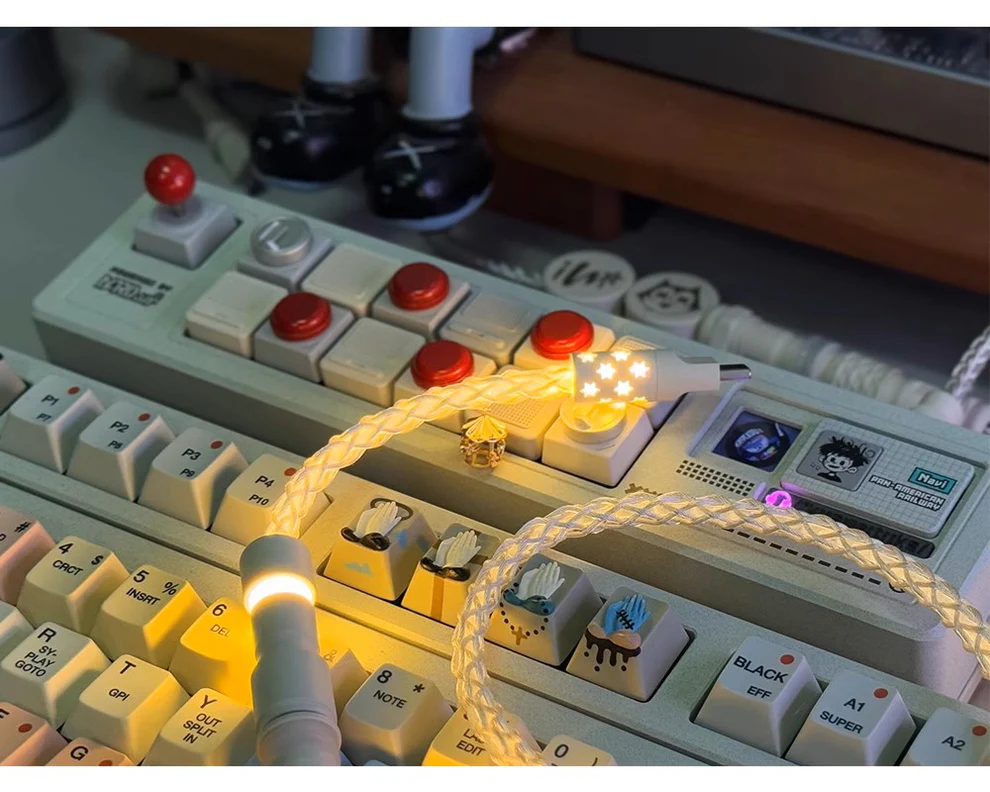
In today’s era of mechanical keyboards, customization goes far beyond switches and keycaps. One often-overlooked component—the keyboard cable—can significantly impact both performance and aesthetics. Whether you’re a gamer, programmer, or office user, choosing the right cable ensures stable connectivity, durability, and a cleaner desk setup.
In this guide, we’ll break down everything you need to know about keyboard cables, from types and materials to real-world use cases and buying tips—helping you make an informed, SEO-smart purchase decision.
What Is a Keyboard Cable and Why Does It Matter?
A keyboard cable is the physical connection between your keyboard and computer, typically using USB interfaces such as USB-A to USB-C or USB-C to USB-C. While it may seem like a simple accessory, it plays a crucial role in signal transmission, power delivery, and even desk organization.
In practical use, a low-quality cable may lead to intermittent disconnections, latency issues, or faster wear and tear. According to USB-IF (USB Implementers Forum), certified cables ensure stable data transfer rates and proper shielding against electromagnetic interference (EMI), which can affect peripheral performance in high-density setups.
For example, gamers using high polling rate keyboards (1000Hz and above) may notice inconsistencies if the cable lacks proper shielding. Similarly, professionals working long hours benefit from cables that resist tangling and maintain durability over time.
Beyond functionality, keyboard cables have become a design statement. Custom coiled cables, aviator connectors, and color-matched builds are now common in enthusiast setups, combining utility with personalization.
What Are the Different Types of Keyboard Cables?
Keyboard cables come in several types, each suited for different use cases and aesthetic preferences. Understanding these variations can help you choose the right one for your setup.
| Type |
Description |
Best For |
| Straight Cable |
Simple, direct cable without coils |
Office setups, minimalists |
| Coiled Cable |
Features a spring-like coil section |
Custom setups, desk aesthetics |
| Detachable Cable |
Includes connectors like aviator or GX16 |
Enthusiasts, portability |
| USB-C to USB-C |
Modern reversible connection |
Laptops, modern devices |
Coiled cables have gained popularity in recent years, especially in the mechanical keyboard community. They offer flexibility and reduce desk clutter while adding a premium look. Detachable cables, often featuring metal connectors, allow users to swap cables without unplugging from the keyboard directly—helpful for multi-device users.
According to community discussions on platforms like Reddit and Geekhack, many users prefer coiled cables not just for aesthetics but also for better cable management in compact desk setups.
How Do Keyboard Cable Materials and Build Quality Affect Performance?
Material quality directly impacts a keyboard cable’s durability, flexibility, and signal stability. While most cables may look similar externally, internal construction can vary significantly.
High-quality cables typically include:
- Oxygen-free copper wiresfor better conductivity
- Double shieldingto reduce signal interference
- Durable outer sleevingsuch as paracord or PET
For example, paracord sleeving provides a soft, flexible feel, making it easier to route cables across desks. In contrast, PET sleeving offers higher abrasion resistance, which may be more suitable for heavy-use environments.
A real-world scenario: users who frequently travel with their keyboards often report that reinforced connectors and thicker insulation significantly reduce cable failure over time.
According to USB-IF official guidelines, proper shielding and cable thickness are essential to maintain signal integrity, especially for high-speed USB connections.
What Features Should You Look for in a High-Quality Keyboard Cable?
When choosing a keyboard cable, several features can enhance usability and longevity:
- Connector Type:Ensure compatibility (USB-C, Micro-USB, Mini-USB)
- Cable Length:Typically between 1.2m to 2m depending on setup
- Detachable Connectors:Adds convenience and customization
- Shielding:Reduces interference and improves signal stability
- Flexibility:Prevents kinks and tangling
Additionally, aesthetic customization is increasingly important. Many users now match cable colors with keycaps or desk themes, enhancing the overall visual experience.
If you’re exploring premium options, you can check out our curated collection here: keyboard cable
Customer reviews across e-commerce platforms often highlight durability and connector quality as key decision factors, especially for users investing in high-end mechanical keyboards.
How to Choose the Best Keyboard Cable for Your Setup?
Choosing the right keyboard cable depends on your specific use case, environment, and preferences.
- For Gaming:
Look for cables with strong shielding and stable connections. While cables don’t directly reduce latency, poor-quality ones can introduce inconsistencies in signal transmission.
- For Office Work:
A simple straight cable with good flexibility is usually sufficient. Durability and comfort matter more than aesthetics here.
- For Custom Setups:
Coiled cables with detachable connectors offer both style and functionality. Many enthusiasts prefer aviator connectors for their industrial look.
- For Portability:
Lightweight, detachable cables are easier to pack and reduce wear on keyboard ports.
| Use Case |
Recommended Cable Type |
| Gaming |
Shielded straight or coiled cable |
| Office |
Simple straight cable |
| Custom Desk Setup |
Coiled cable with aviator connector |
| Travel |
Detachable lightweight cable |
Ultimately, there is no one-size-fits-all solution. The best keyboard cable balances performance, durability, and visual appeal based on your needs.
Conclusion
A keyboard cable may seem like a small detail, but it plays a meaningful role in your overall typing and gaming experience. From ensuring stable connectivity to enhancing your desk aesthetics, the right choice can make a noticeable difference over time.
By understanding cable types, materials, and features, you can confidently select a product that fits your setup. Whether you prioritize performance, durability, or style, investing in a high-quality keyboard cable is a practical and worthwhile decision.
FAQs
What is the difference between coiled and straight keyboard cables?
Coiled cables include a spring-like section that helps manage length and adds visual appeal, while straight cables are simpler and often more practical for everyday use.
Are custom keyboard cables worth it for gaming and typing?
They can be, especially if you value durability and aesthetics. While performance differences may not always be dramatic, higher-quality materials and connectors can improve reliability.
How do I maintain and extend the lifespan of my keyboard cable?
Avoid sharp bends, unplug gently, and store cables properly when not in use. Using cable organizers can also help reduce wear over time.